
Offline Invoicing, Inventory & ERP New
SaralERP
Billing, stock and accounts that keep working — even without internet.
SaralERP runs on your own computers and local network, so billing never stops because the internet did. Create GST-ready invoices, manage stock across godowns, track customer and supplier outstanding, and get the reports you need — with your data stored securely on your premises.
- 100%
- Works offline
- GST
- Ready invoicing
- LAN
- Multi-user
Tax Invoice
INV/26-27/0418
Bill to
Shree Traders
Godown
Main Warehouse
See it in action
The real SaralERP screen
No stock images — this is the actual software your team will use.
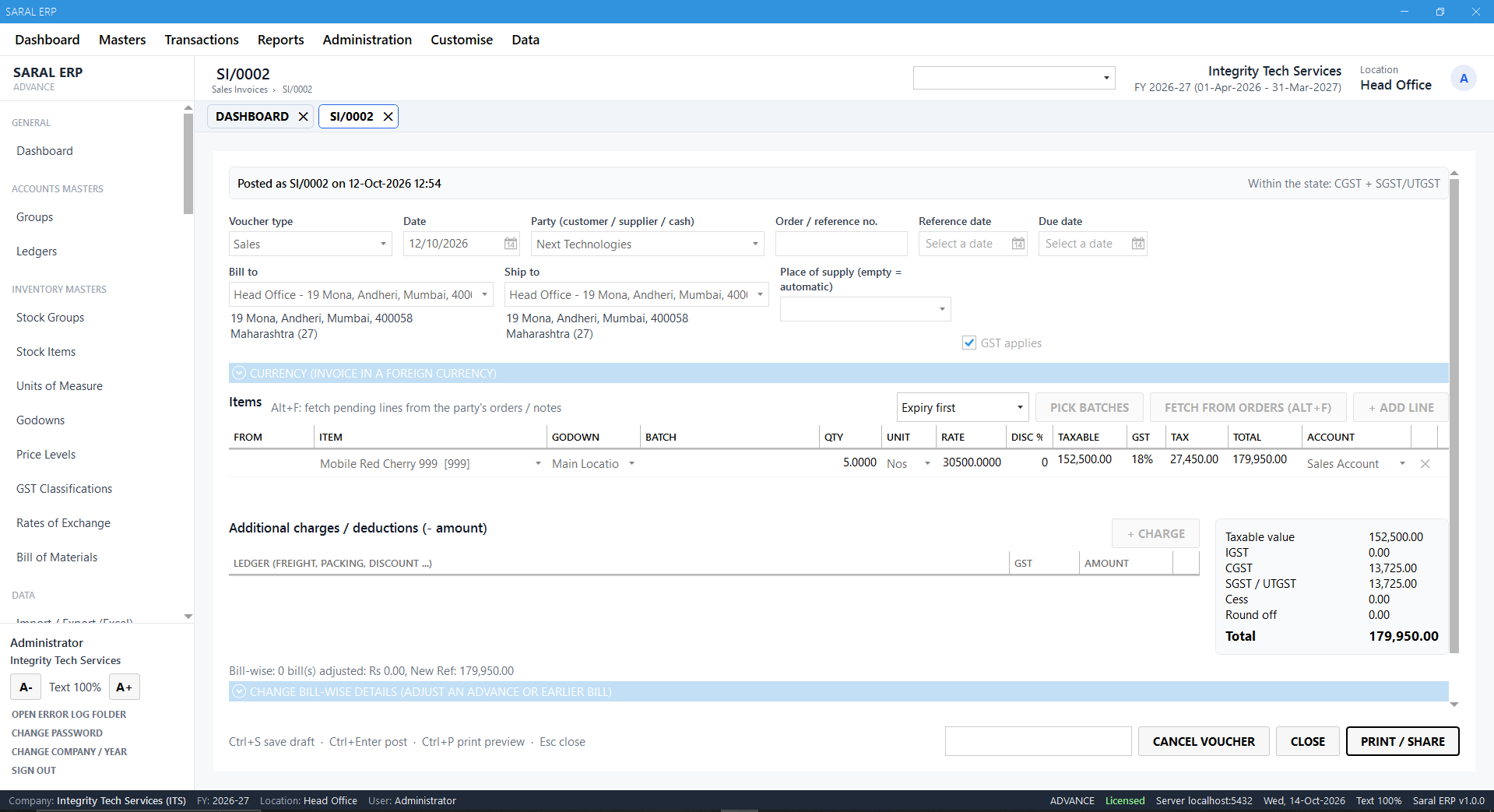 Click to enlarge
Features
Everything you need, nothing you don’t
Offline-first
Runs on your PC or office network with a local database. No internet dependency, no monthly cloud lock-in.
GST invoicing
B2B and B2C tax invoices, quotations, proforma, delivery challans, credit and debit notes — with your own print formats.
Inventory control
Multiple godowns, batch and expiry, units and alternate units, reorder levels and stock transfers.
Purchase & sales orders
Track orders from quotation to delivery to invoice, with pending-order reports.
Party ledgers & outstanding
Customer and supplier accounts, receipts, payments and bill-wise outstanding at a glance.
Barcode billing
Print barcode labels and bill at the counter with a scanner for fast, error-free checkout.
Reports that matter
Sales register, stock summary, GST summary, profit by item and day book — exportable to Excel and PDF.
Tally export
Push vouchers and masters to Tally with DataSync so your accountant keeps working in Tally.
How it works
Up and running in 3 simple steps
-
1
Install & configure
We install SaralERP on your systems, set up your company, tax details and print formats.
-
2
Import your masters
Items, customers and suppliers are imported from Excel or Tally — no retyping.
-
3
Train & go live
Hands-on training for your team, with local backups configured from day one.
Benefits
Why businesses choose SaralERP
- Billing never stops due to internet issues
- Your data stays on your premises
- One-time setup, simple to learn
- Accurate stock and dues, every day
- Seamless hand-off to Tally for accounts
Ideal for
- Retail shops
- Wholesalers & distributors
- Small manufacturers
- Service businesses
- Hardware & electricals
- FMCG dealers
See SaralERP working with your own data in a free, no-obligation demo.
Book your demoFAQ
SaralERP — common questions
Does SaralERP need internet?
No. It works fully offline on a single PC or across your office LAN. Internet is only needed if you choose to take cloud backups or send documents by email/WhatsApp.
Can multiple users work at the same time?
Yes. SaralERP supports multiple users on a local network with user-wise rights for billing, purchase, stock and reports.
Can it work alongside Tally?
Yes. Using our DataSync integration, invoices and masters from SaralERP can be pushed to Tally so accounts stay in one place.
How is my data backed up?
Automatic scheduled backups to another drive or folder are configured at installation; optional off-site backup can be added.